
Reviewed · NIAGARA FALLS DAY TRIPS FROM TORONTO
Amazing Scavenger Hunt: Hunt Along Niagara Falls
Niagara Falls becomes your game board. This self-guided scavenger hunt has you move between major stops, answer riddles in the Let’s Roam app, and earn photo-style challenges while you’re walking on your own schedule. I like that it turns a sightseeing loop into something you can do with friends or family, not just something you stand and look at.
My favorite part is the built-in structure: each player gets an individual role and a task, so you’re not all doing the same thing. I also like that you’ll end up at big-name viewpoints like Skylon Tower and the Falls themselves without having to plan a tight route. The one real consideration is phone connectivity; one reported experience failed to complete when WiFi was intermittent, so plan for patchy service.
In This Review
- Key things to know before you start
- Why this Niagara Falls scavenger hunt feels different
- Price and value: what $12.44 per person actually buys
- Timing, start point, and how to plan your 2-hour loop
- Stop-by-stop: Nikola Tesla to Horseshoe Falls
- Stop 1: Nikola Tesla Monument
- Stop 2: Queen Victoria Park
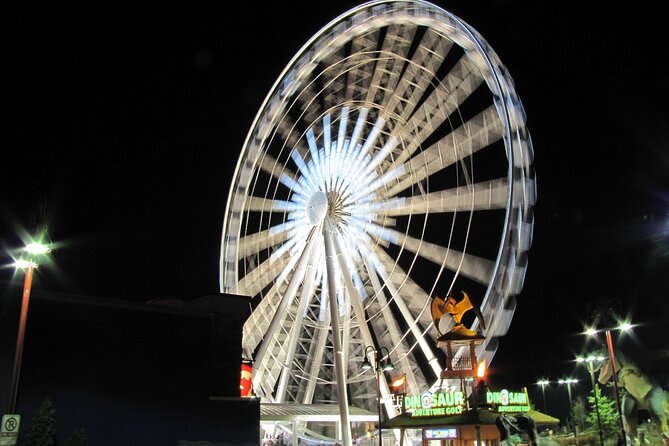
- Stop 3: Niagara SkyWheel
- Stop 4: Skylon Tower
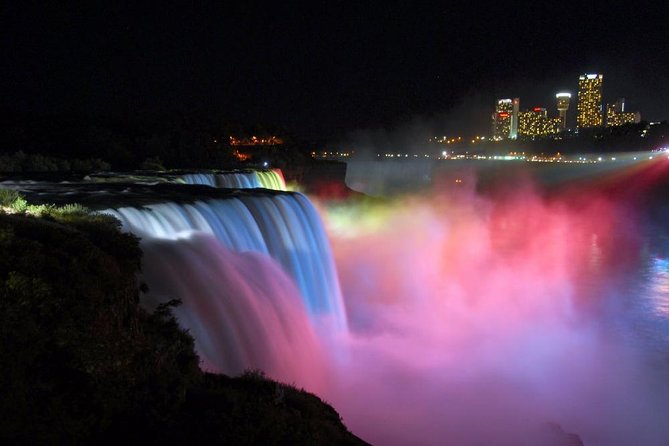
- Stop 5: Niagara Falls
- Stop 6: Horseshoe Falls
- Your phone is the guide: app use, roles, and the real WiFi risk
- Photo challenges and digital keepsakes you can actually use
- Support, pacing, and why self-guided can be a win
- Who this Niagara Falls hunt suits best
- Should you book this Niagara Falls scavenger hunt?
- FAQ
- How long is the Niagara Falls scavenger hunt?
- Where does the hunt start and end?
- Is there a live guide with this experience?
- What do players do during the hunt?
- What should I bring for the hunt?
- Is the experience refundable if I cancel?
Key things to know before you start

- Self-guided at your pace: you can start anytime during the operating window and work through the stops on your own timing
- Player roles make it team-friendly: choose Braniac, Photographer, or Mapper-style challenges so everyone contributes
- 6 key sights, in a clear order: Nikola Tesla Monument, Queen Victoria Park, Niagara SkyWheel, Skylon Tower, Niagara Falls, Horseshoe Falls
- Photo challenges + digital photo copies: you’ll get photo prompts and keep your images afterward
- Works only if your phone cooperates: the hunt runs through the app and needs working connectivity and a charged device
- Moderate walking is part of the deal: comfortable shoes matter, since you’re covering multiple stops around the area
Why this Niagara Falls scavenger hunt feels different
Most Niagara Falls outings fall into two buckets: a guided tour where you listen, or a hop-on-hold-on experience where you decide what to see and how to see it. This one splits the difference. You use your smartphone as the navigator and puzzle checker, and you do the sightseeing while you’re solving something.
The fun isn’t just the thrill of being outside by the water. It’s the way the hunt forces your attention. Instead of glancing at a landmark and moving on, you’ll be looking for specific answers, angles for photos, and small details that you might otherwise miss. That turns the whole “Niagara wow” factor into something more personal.
And because it’s designed as a game for groups, it’s also a good match for mixed interests. One person can focus on spotting, another on mapping, and another on the camera prompts.
We have more Niagara Falls day trips that run straight out of Niagara Falls and Around



Price and value: what $12.44 per person actually buys
At about $12.44 per person for roughly 2 hours, the real value is that you’re paying for a route + prompts + app experience—not for a live guide. You’re getting:
- a self-guided adventure plan across 6 stops
- individual roles so everyone gets a different type of task
- photo challenges with the option to pick roles like Braniac, Photographer, or Mapper
- the Let’s Roam app access for maps, riddles, and leaderboards
- digital copies of your adventure photos
- phone/email/chat support
That’s a lot of “stuff” for a low price, but it comes with an important trade-off: you’re relying on your own phone and on the app experience working reliably. If the app can’t load prompts or connect to map features, the value drops fast.
If you travel with kids, this kind of structure can be a bargain because it reduces the “are we done yet” problem. If you travel as a couple or a small group, it can be a good way to stay entertained while still seeing the main sights.
Timing, start point, and how to plan your 2-hour loop

This hunt is listed as 2 hours (approx.), and it runs daily from 7:00 AM to 10:00 PM. You’ll choose your start time because the tour is self-guided, and it ends back at the meeting point.
Your start location is:
6650 Niagara River Pkwy, Niagara Falls, ON L2G 7B7, Canada
I like that the meeting point is close enough to the core attraction area that you’re not trying to solve a multi-zone logistics problem. You’re basically building a mini route through the Niagara Falls area and hitting several famous stops.
A practical tip: give yourself a little cushion. Even if you finish in about two hours, you’ll probably want time for quick photo moments at the Falls viewpoints and a stop or two to reset your phone if the app acts up.
Also, the experience is described as suitable for anyone with moderate physical fitness, and you should expect walking. Bring comfortable shoes and dress for weather, since the hunt takes place outdoors and you’ll be outside long enough to feel it.
Stop-by-stop: Nikola Tesla to Horseshoe Falls
Here’s what to expect at each location, and what each stop is likely to add to the experience.
Stop 1: Nikola Tesla Monument
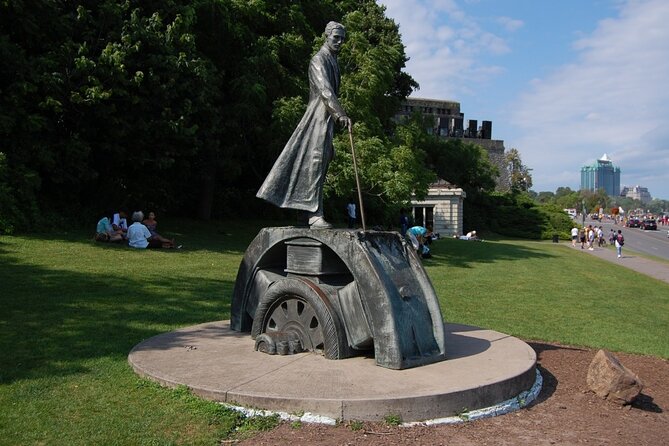
The hunt starts at the Nikola Tesla Monument, which is a fun choice because it flips the usual Niagara Falls story. Instead of beginning at the water, you start with invention and ideas—then your puzzles and photo challenges steer you toward landmarks that shaped the area’s identity.
What makes this stop work in a game format: it’s a clear, recognizable anchor point. You can get oriented quickly, start the app, and establish your group roles before you move into the busier sights.
Potential drawback: if you’re arriving during a peak crowds window, you might need a minute to find a calm pocket to read prompts and aim a camera photo challenge.



Stop 2: Queen Victoria Park
Next up is Queen Victoria Park, a spot that pairs well with puzzle hunting because there’s plenty to look at and compare. Parks are great for scavenger hunts because you can slow down, scan details, and still feel like you’re on a relaxing detour rather than racing from place to place.
For your team, this is a good place to let different roles shine:
- Mapper-type tasks can focus on directions and layout
- Braniac-style tasks can handle the puzzle reading
- Photographer-type tasks can take advantage of sightlines and framing
Drawback to watch for: if it’s rainy or windy, outdoor path conditions can make it harder to pause and focus on photo prompts. You’ll still be fine with decent shoes and weather-appropriate layers.
Stop 3: Niagara SkyWheel
The hunt then moves to Niagara SkyWheel. This is one of those locations where the challenge likely pushes you to think about viewpoint and perspective, which is perfect for a place built around “seeing from above.”
What you’ll enjoy here is the shift in energy. Up to this point, you’ve been in a more walking-and-looking mode. The SkyWheel stop is a reminder that Niagara Falls is not only something you stare at from ground level—it’s also something you experience through vantage points.
Practical consideration: if you’re planning around your phone battery, this is a good time to do a quick check. You’ll likely be using the app more actively at the transition points between stops.
Stop 4: Skylon Tower
Then it’s Skylon Tower, which is one of the best-known overlooks in the area. Even if you don’t go all the way up, the tower itself gives you a clear “big view” target.
In a scavenger hunt, this kind of landmark matters because it creates a payoff. After you’ve solved puzzles and followed prompts, you arrive at the sort of stop that makes you pause and look outward.
Possible downside: if you’re sensitive to heights or crowds, aim for a quieter moment to take in the scene. The app will be your guide for the photo/riddle steps, but you control how long you linger.
Stop 5: Niagara Falls
Now you hit the water itself at Niagara Falls. This is the part that turns your game into an actual experience. The audio and mist effects don’t care about your checklist.
This stop is also where I’d expect the hunt design to feel most satisfying: you’re likely to get pulled toward specific viewpoints or photo prompts that make you pay attention to what you’re seeing rather than walking past the roar.
Important practical point: weather can change everything here. If it’s windy, misty, or rainy, protect your phone. A wipe-on cloth and a small waterproof pouch can save you from a lot of frustration.
Stop 6: Horseshoe Falls
Finally, you end at Horseshoe Falls, which is the classic Niagara shape most people come for. In a game format, this feels like the grand finale because it’s the most iconic “yes, this is it” moment.
Why it’s a strong ending: after multiple stops, you’ve already warmed up your observation skills. So when you reach the falls, you’re not just reacting—you’re noticing.
Main consideration: water-area footing can be uneven depending on weather and crowd flow. Keep your pace calm, and don’t let speed ruin your ability to read app prompts and take the photos you need.
Your phone is the guide: app use, roles, and the real WiFi risk
This hunt runs through the Let’s Roam app. You’ll use it for maps, photo challenges, riddles, and leaderboards. Each player has an individual role, which helps you spread tasks across the group instead of everyone waiting for the same screen.
Here’s the key practical rule: make sure your device is ready before you start. The instructions specifically say to keep your phone fully charged, and you may want a power bank. That matters because you’re using navigation features and the app interaction during the walk.
Now for the part you should take seriously. One reported experience described failure to complete the hunt because WiFi was intermittent while they were walking around. The customer service response they received emphasized the need for continuous WiFi. I can’t guarantee that’s how it will go for everyone, but it is enough to change how you plan.
My advice:
- Start with the app downloaded and ready to go on arrival.
- If you notice connection problems early, don’t keep marching deeper into dead zones. Pause and troubleshoot.
- Consider keeping the route flexible so you can reattempt prompts if the app stalls.
- If your plan depends on constant connectivity, be honest about that before you pay and head out.
Photo challenges and digital keepsakes you can actually use
This experience isn’t only about walking; it’s also about shooting and collecting. Every player has photo challenges, and you can choose roles like Photographer or Mapper (with Braniac-style tasks as well).
What I like about this for real life: the phone-based tasks encourage you to take photos with intent. Instead of random snapshots, you’ll have prompts that shape how you frame shots. That usually results in better photos and less aimless clicking.
You’ll also receive digital copies of your adventure hunt photos. That means you’re not just taking pictures for the moment—you’re getting a tidy set to keep and share.
Drawback to consider: if you’re the type who hates being told what angle to take, you may find photo challenges feel a little structured. If you enjoy light prompts and playful tasks, you’ll likely have a great time.
Support, pacing, and why self-guided can be a win
There’s phone/email/chat support if you run into issues, and the experience is described as private to your group only. That tends to make self-guided adventures feel less chaotic than a shared guided tour where you’re herding people along.
Because you can start at any time and at your own pace, you can tailor your hunt:
- If you travel with kids, you can slow down for details and regroup often.
- If you’re two adults who like efficient routes, you can move faster and keep the energy up.
The 2-hour estimate is a helpful target, but build in a little buffer for photos at the Falls. The end-to-end experience is outdoors, and weather can push you to take breaks and find shelter.
Who this Niagara Falls hunt suits best

I think this works best if you want Niagara Falls to feel more like an activity and less like a line of attractions.
It’s a strong fit for:
- families looking for a structured way to keep everyone engaged
- groups of friends who like friendly competition and challenges
- couples who want a shared task while still seeing major landmarks
It may be a rough fit if:
- your phone battery is unreliable
- you hate app-based navigation or puzzle prompts
- you know you’ll have patchy connection and you don’t want to deal with troubleshooting
Because of the moderate walking requirement, it also helps if your group is comfortable covering multiple stops.
Should you book this Niagara Falls scavenger hunt?
I’d book it if your group will enjoy playful challenges, wants to see Skylon Tower and the Falls area without overthinking route planning, and you’re okay using a smartphone for the experience.
I wouldn’t book it if you expect guaranteed smooth connectivity the whole time. The app-based nature is the big upside, but it’s also the big risk, based on at least one reported case where intermittent WiFi prevented completion.
If you do book, go in prepared: fully charge your phone, pack a power bank, wear comfortable shoes, and check the weather. Bring patience for the Falls area and keep your group flexible if the app gets stubborn.
FAQ
How long is the Niagara Falls scavenger hunt?
It’s listed as about 2 hours.
Where does the hunt start and end?
It starts at 6650 Niagara River Pkwy, Niagara Falls, ON L2G 7B7, Canada, and it ends back at the meeting point.
Is there a live guide with this experience?
No. It’s self-guided and you’ll use the Let’s Roam app for maps, photo challenges, and riddles.
What do players do during the hunt?
Each player has an individual role and photo challenges. You can choose between Braniac, Photographer, or Mapper, and you’ll use the app for the tasks and leaderboards.
What should I bring for the hunt?
Bring a fully charged smartphone. The instructions recommend a power bank if needed, and wear comfortable shoes with weather-appropriate clothing.
Is the experience refundable if I cancel?
No. It’s non-refundable and cannot be changed for any reason.
More Niagara Falls Day Trips from Toronto



More Tour Reviews to line up around Toronto and Niagara
Not sure yet? Here is more to see and do across Niagara Falls and Around, just reviewed












More Niagara Falls Day Trips from Toronto to size up.
 ★ 4.8Niagara Falls: Premium Tour, Boat & Journey Behind the FallsFrom $1524,207 reviews
 ★ 4.6Niagara Falls Day Tour with Optional Boat CruiseFrom $533,178 reviews
 ★ 5.0Best of Niagara Falls Canada Premium Tour: Behind Falls and BoatFrom $1473,139 reviews
 ★ 5.0Niagara Falls Day Tour from TorontoFrom $702,889 reviews
 ★ 5.0Niagara Falls Canada Day Tour From Toronto + Boat Cruise OptionFrom $632,576 reviews
 ★ 5.0Niagara Falls from Toronto: Skip-the-Line Boat & Skylon TowerFrom $512,406 reviews
 ★ 4.6Niagara Falls, Canada: Evening Fireworks CruiseFrom $352,335 reviews
 ★ 4.6Niagara Falls, Canada: Skylon Tower Observation Deck TicketFrom $162,289 reviews
This tour also ranks in